
When several governance actions are open at the same time, you do not have to vote on them one by one. The voting dashboard lets you pick a choice for each action and submit everything as a single transaction: one wallet prompt, one signature, one network fee. This guide covers how the batch flow works, how rationales behave in a batch, and the limits that apply.
How it works
- Open your voting dashboard and connect as usual (see How to vote).
- Each open action has Yes, No, and Abstain buttons directly in its row. Pick a choice for every action you want to vote on. Clicking the same choice again deselects it.
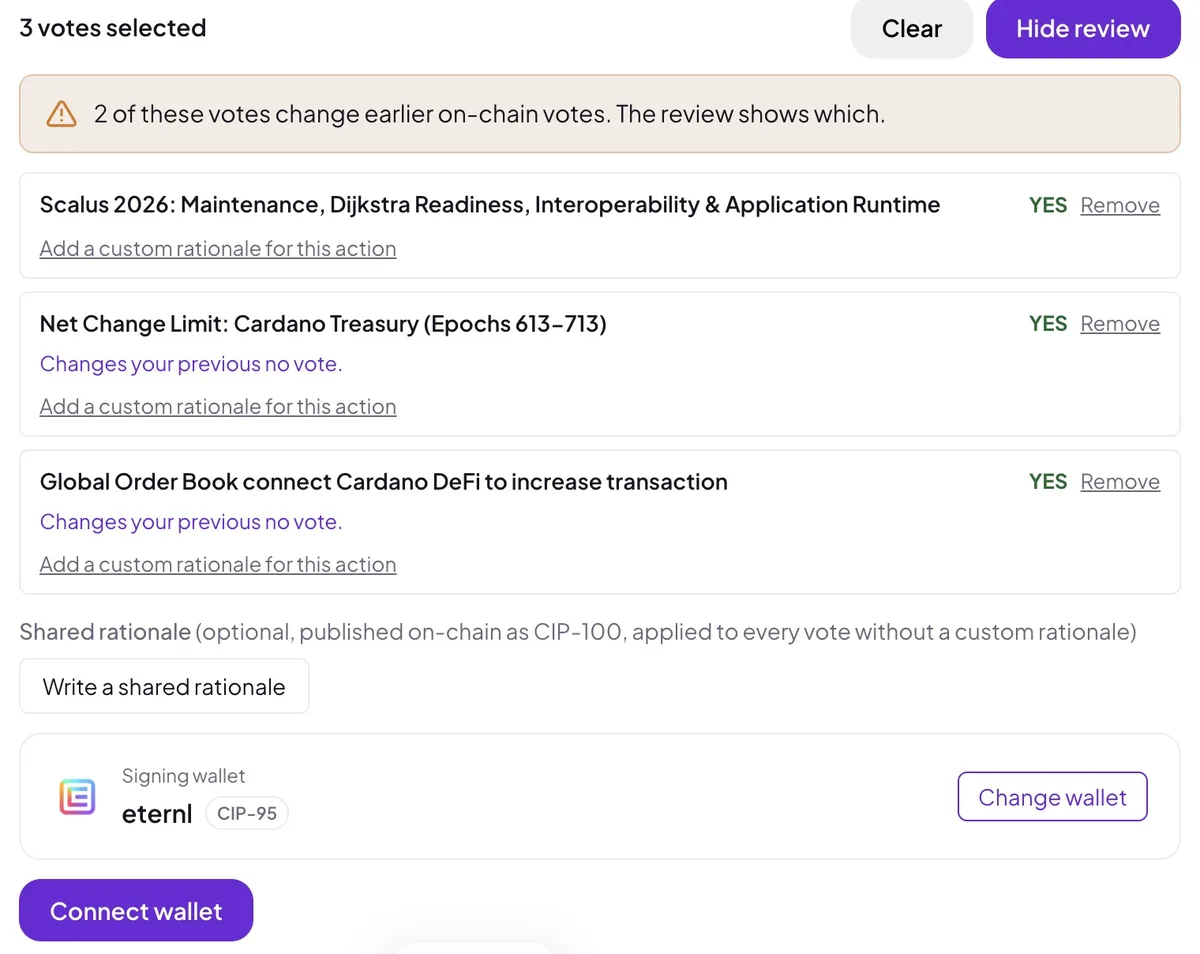
- A bar appears at the bottom counting your selections. Open Review & submit to check the batch: change or remove entries, add rationales, then submit.
- Your wallet shows one transaction containing all selected votes. Approve it once and every vote is cast together.
Selecting a choice in a row does not submit anything by itself. Nothing is signed or sent until you approve the transaction in your wallet.
Rationales in a batch
You have three options, and you can mix them freely:
- No rationale. Leave everything empty.
- One shared rationale. Write a single text that is attached to every vote in the batch.
- Per-action rationales. Give any action its own custom text, which replaces the shared rationale for that action only.
Rationales are written in the same editor as single votes, with Markdown support and a preview. Each rationale is published on-chain (CIP-100) with its vote. Identical texts share one published document.
Limits
- Up to 50 votes per batch. All submitted as one transaction. In practice the real ceiling is simply how many governance actions are open at the same time.
- Up to 10 different rationale texts per batch. What counts is the number of distinct texts, not the number of votes. No rationale and one shared rationale always work, at any batch size: a shared text counts once even when it is attached to 50 votes. Identical custom texts are also counted once. If a batch exceeds the limit, the submit button is disabled and a notice explains it before anything is signed. Reuse the shared rationale for some votes, or split the batch into two submissions.
- Up to 60,000 characters per rationale, same as for single votes.
Good to know
- A batch is all-or-nothing. If one of the selected actions stops accepting votes before the transaction is confirmed, the whole transaction fails and no vote in it is cast. The dashboard re-checks every selected action right before signing and removes closed ones with a notice, so this should practically never happen.
- Re-voting is allowed. On-chain, your newest vote on an action counts. The batch bar warns you when a selection would replace one of your earlier votes, and the review list shows exactly which vote changes.
- Drafts survive, locally. Your selections and rationale texts are kept in your browser’s local storage until the transaction is submitted, so an accidental reload or a crash does not lose your writing. Nothing is sent to or stored on a server: a draft never leaves your device, and it is only published once you approve the transaction. This also means a draft does not follow you to another browser or device.
- Single voting still works. Voting inline on an action’s page is unchanged, and DReps with a script credential (multisig) continue to vote there.